

Monitoring
Security alerts and login activity
What the plugin watches on each site: vulnerable plugins, new administrators, login attacks, wp-config.php changes and suspicious files, and how you hear.
Applies to: All plans
The plugin reports each site's plugins, themes, administrators and a few sensitive files, and WP Admin Online flags what looks wrong. Everything here works on every plan, except applying security patches automatically.
Vulnerable plugins, themes and WordPress
Every plugin, theme and WordPress version is checked against public vulnerability databases every day at 04:00 UTC, and again whenever a sync finds a plugin or theme change. Findings show in the Vulnerabilities card on the site's Overview, with a severity from Low to Critical and whether a fix exists, and in the Plugins and Themes tabs under the Vulnerable filter. On the Updates page, Vulnerable only narrows the list to updates that fix one.
You hear about them as Vulnerabilities found and Patch available in the Alerts Centre. On paid plans, Security patches: apply ASAP in a site's auto-update settings applies security fixes after the delay you choose, outside the normal schedule; see Auto-update rules and maintenance windows.
Changes that may mean a break-in
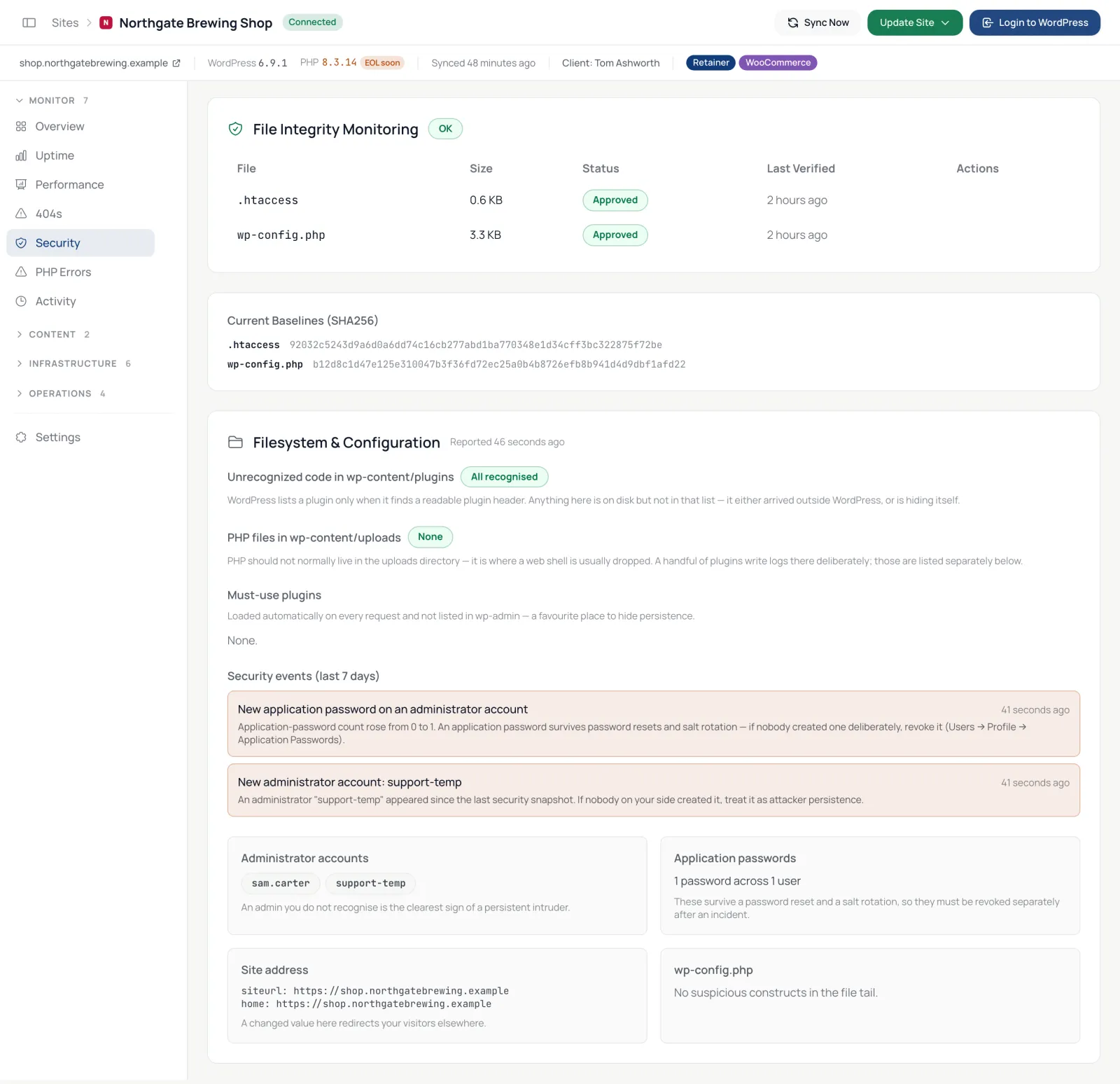
With every sync the plugin sends a security snapshot, and the dashboard compares it with the last one. The Security tab lists what changed under Security events (last 7 days):
- a new administrator account, or one removed;
- a new application password on an administrator account;
- a change to the WordPress or site address;
- a new must-use plugin;
- a change at the end of
wp-config.php.
The dashboard also flags unrecognised code in wp-content/plugins, PHP files in wp-content/uploads, a security plugin being switched off, and a plugin switched on without a normal install. These reach you as Security incidents within five minutes of the dashboard seeing them, or in your digest if you group them. Because the snapshot comes with the sync, a new administrator is noticed at the next sync: every 6 hours on paid plans, every 24 hours on free. If the site cannot list its administrators during a sync, for example while its database is restarting, the dashboard keeps the last list it saw instead of reporting every administrator as removed.
File integrity
The dashboard keeps a checksum of wp-config.php and .htaccess and looks for a few patterns attackers leave behind. The checksums are compared on every sync, whether the plugin pushes or the dashboard pulls, so a change is normally noticed within the hour. If either file changes or matches one, the site's Overview shows File Integrity Violation, auto-updates and security patches pause for that site, and you get a Security incidents alert. The Today's work row and the Security tab say when the change was noticed. When the change was yours, open the Security tab and click Approve.
This is not a malware scanner: it watches those two files, not every file on the site.
Copies of a site
A staging copy or an old duplicate of a site keeps the plugin's credentials, so it reports to the dashboard as the live site. The dashboard tells the two apart and records nothing the copy sends. The Security tab lists such copies under Other installs using this site's connector:
- A staging environment your host created (WP Engine, Kinsta, Flywheel, Cloudways, Pantheon or WordPress.com) is listed quietly and nothing more happens.
- Any other copy also appears in Today's work as A copy of this site is reporting as …, with a Security incidents alert. If it really is the same install on another domain, choose Same site, another domain, either there or beside the copy on the Security tab; the domain is then listed under Also answers on, both in the Site address card of the Security tab and under the site's Settings, and either place can remove it again. One install on several domains reports its address under whichever domain the request came in on, so confirming the domain also withdraws the WordPress siteurl changed and home changed alerts it raised, and a move between the site address and a confirmed domain is not reported again.
- Disconnect this copy revokes the credentials stored on the copy, so it stops reporting. Avoid it on a staging site whose database you will copy back to the live site, or the live site will need reconnecting afterwards.
Login activity
The Logins tab lists successful and failed logins for the last 30 days, with the user, IP address and location.
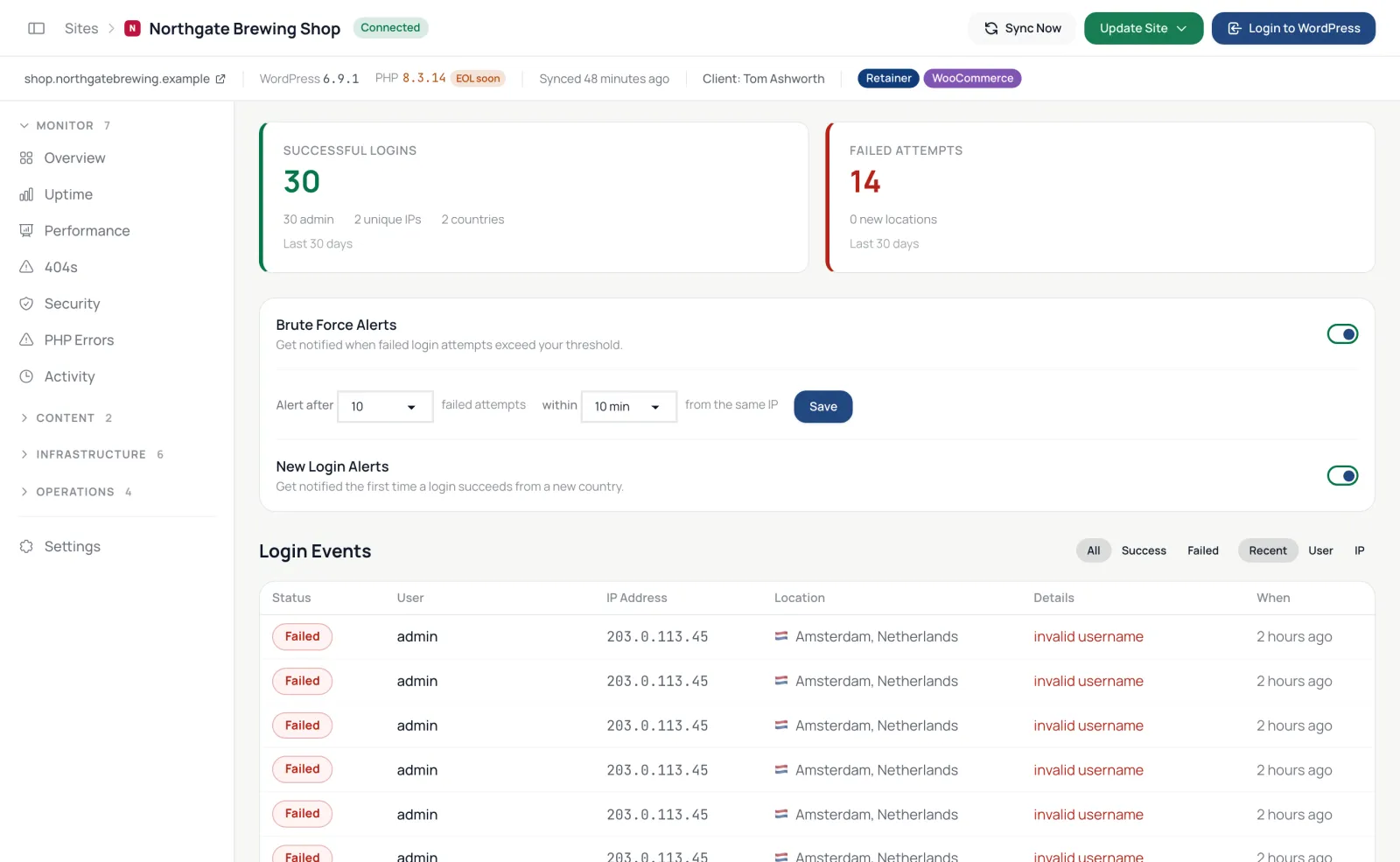
- Brute Force Alerts alert you after a number of failed attempts from one IP address within a few minutes (10 in 10 minutes unless you change it), at most once an hour for each address.
- New Login Alerts alert you the first time someone logs in from a new country.
Both arrive as Security incidents, so they follow that category's channels, grouping and filters in the Alerts Centre. The switches on the Logins tab decide whether the site is watched for them at all.
Configuration checks
The Environment tab's Security Audit checks the site's settings: HTTPS, file editing and file changes disabled in wp-admin, debug output hidden, a custom database prefix, SSL for wp-admin, application passwords and core auto-updates.
What it does not do
There is no malware scanner, firewall or clean-up service, and WordPress core files are not compared with WordPress.org's checksums.
Product overview: Security monitoring